
Introduction
A robot can work well in a lab and still fail when it enters a busy factory, warehouse, or other real environment. The reason is simple: building a robot is only one part of the job. Teams also need to test, deploy, monitor, update, and maintain that robot over time.
This is where RobotOps becomes useful.
RobotOps applies software engineering and operations practices to robotic systems. It brings development, testing, deployment, monitoring, maintenance, and fleet management into one lifecycle.
For a single robot, this approach can make operations easier to manage. For a large fleet, it becomes even more important.
This guide explains the RobotOps lifecycle from the first development step to production operations. It also looks at robot simulation, robotics software, ROS 2, fleet management, observability, incident handling, and maintenance.
What Is RobotOps?
RobotOps is an approach for managing the complete operational lifecycle of robotic systems.
Traditional robotics work often focuses heavily on hardware, control systems, sensors, and robot programming. RobotOps adds another layer: how teams manage those systems after development.
A RobotOps lifecycle can include:
- Robot software development
- Simulation
- Testing
- Validation
- Deployment
- Configuration management
- Monitoring
- Remote operations
- Incident management
- Software updates
- Maintenance
- Fleet management
The goal is not to replace robotics engineering. Instead, RobotOps connects robotics engineering with reliable software and operations practices.
For example, a team may develop navigation software for an autonomous mobile robot. The development team tests it in simulation first. After physical testing, the team deploys it to a small group of robots. Engineers monitor performance and logs. If the deployment works as expected, the team can expand it to more robots.
That complete process forms part of the RobotOps lifecycle.
Why Does the RobotOps Lifecycle Matter?
Robots operate in physical environments. A software problem can therefore create a physical problem.
Consider a warehouse robot that moves materials between storage areas. A software update might change its navigation behavior. If the team updates every robot at once without proper testing, one software issue could affect a large part of the fleet.
A controlled RobotOps process helps reduce this type of operational risk.
It gives teams a repeatable path:
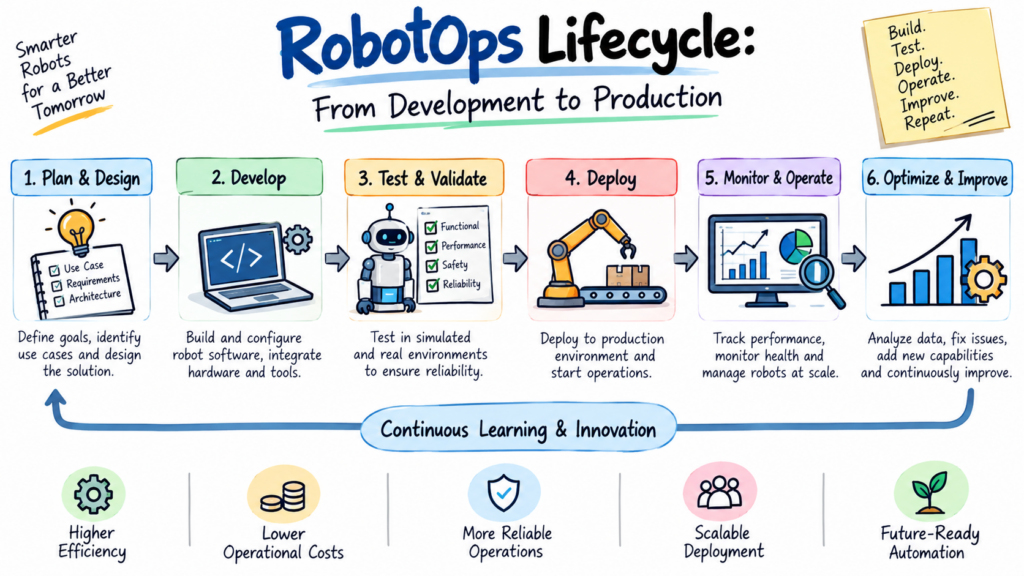
Develop → Simulate → Test → Validate → Deploy → Monitor → Maintain → Improve
The exact process can differ by robot type and industry, but the basic idea remains the same.
The Main Stages of the RobotOps Lifecycle
A practical RobotOps lifecycle usually has several connected stages.
1. Development
Everything starts with development.
Robotics teams create software that controls or supports functions such as:
- Navigation
- Perception
- Motion
- Sensor processing
- Task execution
- Robot communication
- Safety-related behavior
- Fleet interaction
Modern robotics software often contains many components. A robot may need to process sensor information, estimate its position, plan a path, communicate with other systems, and perform a task.
Teams should treat this software as a managed engineering product rather than a collection of scripts.
Version control, code review, automated testing, documentation, and repeatable builds can help teams manage changes.
2. Robot Simulation
Testing directly on physical robots can be expensive and slow.
Robot simulation gives developers a virtual environment where they can test software before using physical hardware.
A simulation can help teams explore situations such as:
- Robot navigation
- Sensor behavior
- Path planning
- Obstacle handling
- Multiple robot interactions
- Different environments
- Software failures
Simulation does not replace physical testing. Real sensors, hardware timing, network conditions, mechanical behavior, and environmental factors can produce results that a simulation does not fully represent.
Instead, simulation provides an earlier testing layer.
A useful workflow looks like this:
Code change → Simulation test → Hardware test → Controlled deployment
This can help teams find some software problems before they reach production robots.
3. Testing and Validation
After development and simulation, teams need to test the system in conditions that become increasingly close to production.
Testing can happen at several levels.
Unit Testing
Developers test small pieces of software.
For example, a team might test whether a function correctly converts sensor data into the expected format.
Integration Testing
Teams check whether multiple components work together.
A navigation component, sensor system, and motion controller may each work separately but fail when connected.
Integration testing helps identify such problems.
Hardware Testing
The software then runs on real hardware.
This stage can expose issues related to:
- Sensors
- Compute resources
- Network connections
- Power
- Timing
- Motors
- Controllers
- Physical movement
Operational Testing
Teams should also test how the robot behaves during normal operations and failure conditions.
Examples include:
- Loss of network connectivity
- Low battery
- Sensor failure
- Unexpected obstacles
- Software crashes
- Robot becoming unavailable
- Conflicting tasks
The goal is not simply to prove that a robot works. The goal is to understand how it behaves when conditions change.
4. Deployment
Once the software passes the required tests, the team can prepare it for deployment.
Robot deployment can involve much more than copying a software package to a robot.
Teams may need to manage:
- Software versions
- Robot configurations
- Hardware differences
- Network settings
- Dependencies
- Security controls
- Rollback plans
- Deployment status
A controlled deployment process becomes especially useful when a company operates many robots.
Instead of changing every robot at the same time, teams may use staged deployment.
For example:
Test robot → Small group → Larger group → Full fleet
If the first group shows unexpected behavior, the team can pause the rollout before affecting the entire fleet.
5. Production Operations
After deployment, the robot enters the production environment.
This is where Robotics Operations becomes a daily activity.
Engineers and operators need to know whether robots are:
- Online
- Moving correctly
- Completing assigned tasks
- Reporting useful telemetry
- Experiencing errors
- Running the expected software version
- Running low on battery
- Waiting for assistance
A production robot should not be treated as a system that gets deployed once and then ignored.
Its condition can change over time.
6. Monitoring and Observability
Monitoring answers a basic question:
Is the robot working?
Observability goes further.
It helps teams understand what is happening inside a system by using available signals such as logs, metrics, events, and telemetry.
For a robot, useful operational information might include:
- Battery state
- Robot location
- Task status
- Error events
- CPU usage
- Memory usage
- Network condition
- Sensor status
- Software version
- Navigation events
ROS 2 provides communication mechanisms such as topics, services, and actions. Topics support continuous data streams, services support short request-and-response interactions, and actions support longer-running tasks with feedback.
ROS 2 also provides logging facilities that can send log information to the console, files, and the /rosout topic.
These capabilities can contribute to a larger observability system, although a complete production monitoring setup usually requires additional infrastructure around the robot software.
7. Robot Fleet Management
Managing one robot is different from managing 100 robots.
Robot Fleet Management provides a way to coordinate and monitor multiple robots.
A fleet management system may help teams track:
- Robot identity
- Current state
- Location
- Assigned tasks
- Battery condition
- Availability
- Software versions
- Errors
- Maintenance status
Fleet systems can also help coordinate robot work.
For example, imagine a warehouse with several autonomous mobile robots. Multiple robots may need to travel through the same areas. The fleet layer can help coordinate their activities and connect robot status with higher-level task management.
OpenRMF, for example, defines interfaces for fleet state reporting and requests such as destinations, movement modes, and paths. It also supports different levels of integration with vendor fleet managers.
The exact architecture depends on the robots, facility, and operational requirements.
8. Robotics Operations Center
A Robotics Operations Center provides a centralized place to understand and manage robotic operations.
Think of it as an operations room for robots.
A Robotics Operations Center may bring together information such as:
- Fleet health
- Robot status
- Alerts
- Software versions
- Deployment activity
- Incidents
- Telemetry
- Maintenance needs
- Operator actions
Instead of checking robots individually, an operations team can use centralized dashboards and tools to identify problems.
For a large deployment, this can improve visibility and make incident response more organized.
9. Incident Management
Robots will eventually experience failures.
The important question is how the team responds.
Suppose an autonomous mobile robot stops moving in a warehouse.
An operator may need to determine:
- Is the robot still connected?
- What task was it performing?
- Did a sensor report an error?
- Is the battery low?
- Did the navigation system fail?
- Did a software update recently occur?
- Does the robot need human assistance?
A good incident process helps teams move from detection to recovery.
A simple flow is:
Detect → Investigate → Contain → Recover → Review
The team can then record what happened and use that information to prevent similar problems.
10. Software Updates and Lifecycle Management
Robotics software changes over time.
Teams may need to release:
- Bug fixes
- Security updates
- New capabilities
- Performance improvements
- Configuration changes
- Hardware support
Every update should have a clear version and deployment record.
Teams should also maintain a rollback plan.
If a new release causes unexpected behavior, the team needs a controlled way to return to a known working version.
This becomes especially important in industrial robotics and large robot fleets.
How ROS 2 Fits Into RobotOps
ROS 2 is a robotics software framework that provides communication and other building blocks for robot applications.
In a ROS 2 system, nodes are units of computation that communicate with other nodes. They can operate within the same process, across processes, or across machines.
This architecture can support RobotOps because production robotics often contains many software components.
For example:
Camera node → Perception → Localization → Navigation → Motion control
Each component may perform a different job.
ROS 2 also includes lifecycle-related functionality through packages such as rcl_lifecycle.
However, ROS 2 itself does not represent the complete RobotOps platform. A production RobotOps environment may also require deployment systems, fleet management, monitoring, security, infrastructure, data storage, and operational processes.
A Simple RobotOps Example
Consider a warehouse that uses autonomous mobile robots to move goods.
Development
Engineers create navigation and task software.
Simulation
The team tests the robot in a virtual warehouse.
Physical Testing
The software runs on a test robot in a controlled area.
Pilot Deployment
The team deploys the release to a small number of production robots.
Monitoring
Operators watch robot status, errors, battery levels, and task performance.
Fleet Expansion
After validation, the software reaches more robots.
Incident Handling
If one robot repeatedly loses localization, operators investigate its logs, sensor status, environment, and software version.
Maintenance
The team fixes the underlying issue and deploys a tested update.
This example shows why RobotOps is a lifecycle rather than a single tool.
RobotOps for Industrial Robotics
Industrial robots often operate in structured production environments.
A typical industrial setup may include:
- Robotic arms
- Controllers
- Sensors
- PLCs
- Manufacturing equipment
- Industrial networks
- Robotics software
- Monitoring systems
RobotOps practices can help teams manage the software and operational side of these systems.
For example, a team may maintain versioned robot applications and configurations, record deployment history, monitor system health, and establish procedures for handling failures.
Safety remains a critical concern. Operational software should never bypass required machine safety systems or established safety procedures.
Common RobotOps Challenges
RobotOps can improve operational discipline, but it also introduces challenges.
Hardware Differences
Two robots from the same fleet may have different hardware conditions or configurations.
Deployment processes must account for these differences.
Network Problems
Robots often depend on communication with other systems. Temporary network problems can affect telemetry, remote commands, or task coordination.
Teams need to design for communication failures rather than assuming constant connectivity.
Physical Environment
Software runs in the real world.
A simulation may not reproduce every surface, obstacle, lighting condition, sensor issue, or human interaction.
Physical validation remains important.
Mixed Software Versions
Large fleets may contain multiple software versions during a rollout.
Teams need clear visibility into which version runs on each robot.
Safety
Robotics systems can interact with people, machines, vehicles, and physical objects.
Safety requirements should remain part of development, testing, deployment, and operations.
RobotOps Best Practices
A strong RobotOps process does not need to be complicated at the beginning.
Teams can start with a few practical habits.
Keep Software Versioned
Every production software release should have a clear version.
Test Before Deployment
Use simulation, automated tests, and physical testing where appropriate.
Deploy in Stages
Avoid making large changes to an entire fleet without validation.
Track Robot State
Know which robots are online, unavailable, active, or reporting errors.
Collect Useful Telemetry
Capture information that helps operators understand robot behavior.
Maintain Rollback Plans
Know how to return to a previous working release.
Document Incidents
Record failures and their causes so the team can learn from them.
Separate Safety From Convenience
Never treat an operational shortcut as a substitute for required safety controls.
Common RobotOps Mistakes
Some operational problems come from simple process gaps.
Deploying Without a Rollback Plan
A team may focus on releasing new software but forget how to recover when the release fails.
Monitoring Too Little
A dashboard that only shows whether a robot is online may not provide enough information to diagnose failures.
Treating Every Robot as Identical
Hardware, configuration, environment, and usage can differ between robots.
Skipping Simulation
Physical testing can take more time and resources than early virtual testing.
Ignoring Operational Feedback
Operators often see problems that developers do not encounter during development.
Their feedback can help improve both software and operational procedures.
A Practical RobotOps Lifecycle Checklist
Before moving a robotics system into production, teams can ask:
Development
- Is the software version controlled?
- Are dependencies documented?
- Are important components tested?
Simulation
- Have major behaviors been tested virtually?
- Have failure scenarios been explored?
Validation
- Has the software been tested on physical hardware?
- Have operational conditions been considered?
Deployment
- Is the release version clearly identified?
- Is deployment staged?
- Is rollback possible?
Monitoring
- Can operators see robot health?
- Are useful logs and telemetry available?
- Can the team identify software versions?
Fleet Operations
- Can the team track individual robots?
- Can operators identify unavailable robots?
- Can the team manage fleet-level events?
Incidents
- Is there a clear response process?
- Are failures recorded?
- Can the team recover safely?
Maintenance
- Are software and hardware issues tracked?
- Can the team deploy fixes in a controlled way?
This checklist can change based on the robot, industry, and safety requirements.
The Future of RobotOps
As robotic deployments grow, operations will become an increasingly important part of robotics engineering.
Teams will need better ways to manage:
- Larger fleets
- More complex robotics software
- Remote operations
- Software releases
- Telemetry
- Simulation
- Predictive maintenance
- Multi-robot coordination
- Infrastructure
- Security
The basic idea will remain the same: a robot needs care throughout its entire lifecycle.
A development team may build the robot software, but production success also depends on the people and systems that test, deploy, monitor, maintain, and improve it.
How RobotsOps.com Can Help
RobotsOps.com focuses on the operational side of robotics.
The platform brings together concepts related to RobotOps, Robotics Operations, Robot Fleet Management, Industrial Robotics, Robotics Software, Robot Simulation, Autonomous Mobile Robots, Robotics Automation, Robotics Operations Centers, and ROS 2.
For learners and professionals, this provides a useful way to understand how robotics connects with software engineering, automation, observability, and production operations.
The goal is practical learning: understand the technology, understand the operational problems, and learn how the pieces fit together.
Frequently Asked Questions About RobotOps
1. What is RobotOps?
RobotOps is a way to manage the complete lifecycle of robotic systems. It covers development, testing, simulation, deployment, monitoring, maintenance, software updates, and daily robot operations.
2. Why is RobotOps important for robotics?
RobotOps helps teams manage robots after development. It provides a structured approach for deploying software, monitoring robot health, handling incidents, and maintaining robotic systems in production.
3. What are the main stages of the RobotOps lifecycle?
The main stages include development, simulation, testing, validation, deployment, monitoring, incident management, maintenance, and continuous improvement.
4. How does robot simulation help RobotOps?
Robot simulation lets teams test robotics software in a virtual environment before running it on physical robots. It can help developers find software and navigation problems earlier and reduce unnecessary physical testing.
5. What is Robot Fleet Management?
Robot Fleet Management involves managing multiple robots from a central operational system. It can include robot status, location, tasks, battery information, software versions, telemetry, and operational alerts.
6. How does monitoring help robotic systems?
Monitoring helps teams understand the current condition of robots. It can show information such as connectivity, battery state, software errors, task status, sensor conditions, and other operational data.
7. What is a Robotics Operations Center?
A Robotics Operations Center is a centralized operational environment used to monitor and manage robotic systems. It can bring together fleet status, telemetry, alerts, deployments, incidents, and maintenance information.
8. What role does ROS 2 play in RobotOps?
ROS 2 provides communication and software infrastructure used by many robotics applications. Its nodes, topics, services, actions, logging, and lifecycle-related capabilities can support parts of a RobotOps architecture.
9. Is RobotOps useful for industrial robotics?
Yes. RobotOps practices can help teams manage software, configurations, monitoring, deployments, maintenance, and operational processes around industrial robotic systems.
10. How does RobotOps support autonomous mobile robots?
RobotOps can help teams manage software deployment, navigation systems, telemetry, fleet coordination, monitoring, incidents, and maintenance for autonomous mobile robots.
11. Why should robotics teams use staged software deployment?
Staged deployment allows teams to release software to a small number of robots before expanding the release to a larger fleet. This can help teams identify unexpected problems before they affect many robots.
12. What information should teams monitor on production robots?
Useful information can include robot availability, battery state, location, task status, software version, error events, network condition, sensor status, and system resource usage.
13. How does RobotOps help with robot maintenance?
RobotOps can help teams track failures, monitor system health, manage software updates, record maintenance events, and identify recurring operational problems.
14. Can RobotOps reduce robotics downtime?
A well-designed RobotOps process can help teams detect problems earlier and respond
Final Thoughts
A robot does not finish its journey when development ends.
The real lifecycle continues through simulation, testing, deployment, monitoring, incident response, updates, and maintenance.
That is the central idea behind RobotOps.
When teams treat robotic systems as long-running production systems, they can build clearer processes for managing change and responding to problems. Robot Fleet Management, telemetry, simulation, robotics software, ROS 2, and operational monitoring can all become parts of that larger lifecycle.
For anyone entering robotics today, learning how to operate robots can be just as useful as learning how to build them.
Leave a Reply